 Glimpsa
Reverse face search takes a photo of a person and finds other publicly available photos of that same face — different pictures, different days, different websites. On Android, the whole process takes under a minute: install a face search app, upload the photo, review the scored matches.
Reverse image search vs. reverse face search
These get confused constantly, and the difference decides whether you find anything:
- Reverse image search (Google Lens, TinEye) fingerprints the file. It answers: "where else does this exact picture appear?" Change the photo — different angle, new haircut, a crop — and the trail goes cold.
- Reverse face search fingerprints the face. AI maps facial geometry — the distances and proportions that stay constant across photos — and matches it against indexed faces. It answers the question you actually asked: "where else does this person appear?"
Sherlock runs both at once, so you get exact-copy matches and new photos of the same face in a single search.
The step-by-step tutorial
🤖 Reverse face search on Android with Sherlock
- Install the app. Get Sherlock Face Search on Google Play — free, no account needed to start.
- Upload or capture a photo. Pick from your gallery (screenshots work great) or use the in-app camera. Best results: front-facing, well-lit, face filling the frame.
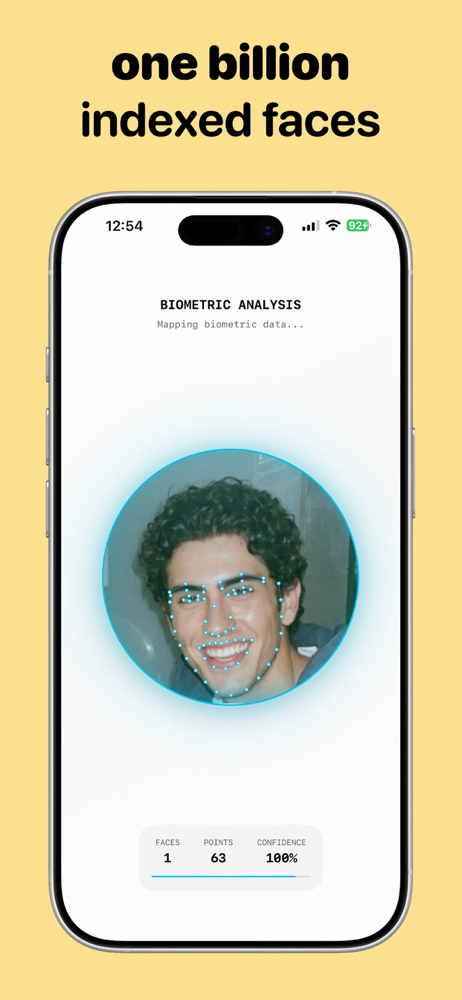
- Let the AI work. Sherlock maps 60+ facial landmark points, then searches publicly available web sources — 8+ social platforms plus websites, blogs and news — against over a billion indexed faces.
- Review your matches. Results are ranked by similarity score with preview thumbnails and direct links. Tap any match to open the page it was found on.
Getting the most accurate results
- Face size matters most. Crop so the face takes up most of the image before searching.
- Avoid obstructions. Sunglasses, masks and heavy filters hide the landmarks the AI needs.
- Search multiple photos. Each photo catches indexed images from a slightly different "angle" of the same face.
- Mind the score. Treat 85%+ as strong, 60–85% as worth checking, below that as look-alikes.
Privacy: how face search handles your data
Reasonable questions, straight answers:
- What gets searched? Publicly available web sources only — pages anyone could visit. No private accounts, no private databases.
- Who sees my searches? Nobody. Sherlock's searches are private, encrypted in transit, and data isn't shared with third parties.
- Is this legal? Searching public sources for legitimate purposes — verifying an identity, checking a suspicious profile, protecting your own images — is exactly what these tools are for. What's never okay: using face search to stalk, harass or dox anyone.
Frequently asked questions
What is a reverse face search?
An AI search that finds other publicly available photos of the same face — not just copies of the same file.
Can I do it free on Android?
Yes — Sherlock is free to download with free searches included. Premium adds unlimited searches and faster processing.
Is it private?
Searches are encrypted in transit and never shared. Only publicly available sources are searched.
Your first face search is a minute away.
Install Sherlock, upload a photo, and see where that face appears online — free on Google Play.