 Glimpsa
The short answer: upload the picture to an AI face search app. Instead of looking for copies of the exact image, face search analyzes the face itself and finds other publicly available photos of the same person — along with the profiles, websites and articles where they appear.
Why a normal Google search usually fails
If you've tried dragging a photo into Google Images, you've probably seen the problem: classic reverse image search looks for the same file. It finds exact copies and near-duplicates, but the moment the person is in a different photo — new angle, new lighting, new haircut — it comes up empty.
Finding a person requires face search: technology that maps the unique geometry of a face and compares it against faces in publicly indexed images. That's the difference between "where else does this file exist?" and "where else does this person appear?"
What you need before you start
- One decent photo. Front-facing and unobstructed works best. Sunglasses, heavy shadows and extreme angles reduce accuracy.
- A face search tool. Desktop engines exist, but if the photo is already on your phone — a screenshot, a WhatsApp image, a camera shot — a mobile app removes all the friction.
- A legitimate reason. Verifying who you're talking to, checking a seller or landlord, reconnecting with someone, or confirming a suspicious profile are all fair game. Face search only surfaces what's already public — use it responsibly.
🔍 Find someone by picture with Sherlock — 3 steps
- Upload or capture the photo. Open Sherlock Face Search and pick the image from your gallery, or snap it with your camera.
- Let the AI analyze the face. Sherlock maps 60+ facial landmark points and searches publicly available web sources — social platforms, websites, blogs and news — against over a billion indexed faces.
- Review ranked matches. Results arrive in seconds with preview images, similarity scores and direct links to the pages where each match appears.
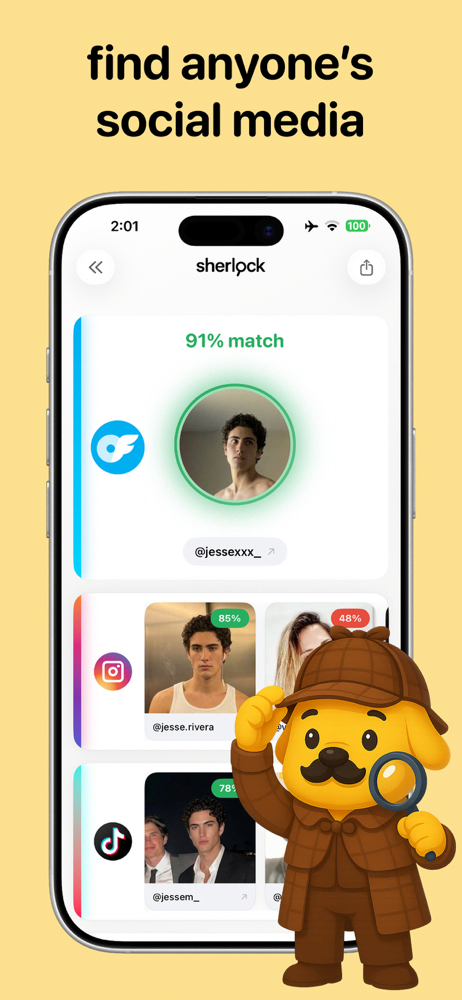
How to read your results
Sherlock ranks matches by similarity score. A high score (85%+) with multiple consistent results — same face across several pages — is a strong signal you've found the right person. From there:
- Open the linked pages to see names, usernames and context around each photo.
- Cross-reference details — do the location, age and story line up with what you already know?
- Watch for mismatches. If the same face appears under several different names, you may be looking at a fake or stolen identity — see our catfish check guide.
Tips for better matches
- Crop the photo so the face fills more of the frame.
- Try more than one photo of the person if you have them — different angles catch different indexed images.
- Prefer originals over screenshots-of-screenshots; every recompression loses detail.
Frequently asked questions
Can I really find someone with just one photo?
Often, yes — if that person's photos appear on publicly available web pages. One clear, front-facing photo is usually enough for meaningful matches.
Does it work with old, blurry or filtered photos?
Sherlock's AI matching recognizes facial features even when an image has been cropped, resized or filtered. Sharper, more recent photos still give the best results.
Is it free?
Yes — Sherlock is free to download on Google Play, with Premium available for unlimited searches and faster processing.
Put a name to the face.
Download Sherlock Face Search and run your first photo search in under a minute — free.